Photos aren't deleted instantly. They go into a candidate queue first, then you confirm all at once before leaving.
Core features free · No uploads
PhotoDel
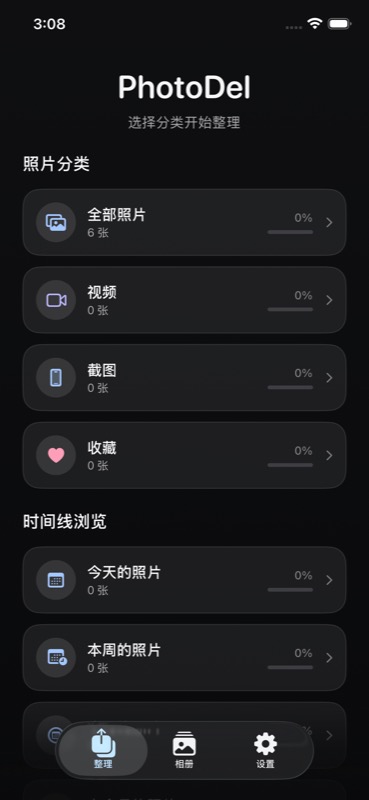
A simpler way to clean your iPhone photo library. Pick a category, swipe left to mark for deletion, right to skip, up to favorite — then confirm all at once.
Clean your library with clear, simple gestures.
PhotoDel skips complex rules and paywalls. The current release focuses on the essentials: categorize, swipe, queue, and batch-confirm.
Don't want to deal with a photo? Swipe right and move on — nothing changes in your library.
Add photos to your favorites candidate list. Batch-confirm it together with deletions at the end.
The current version has no paid features. Cleaning, categorizing, and batch operations are all free.
01
Choose a scope
Enter from All Photos, Videos, Screenshots, Favorites, or Timeline to focus on a specific set.
02
Swipe through each photo
Use swipe gestures or the bottom toolbar to undo, favorite, mark for deletion, or skip.
03
Confirm when done
The Done button in the bottom-right walks you through a confirmation flow, so you always know how to exit.
No photos leave your phone.
PhotoDel uses the iOS Photos framework to read and organize your library. All cleaning decisions, candidate lists, and batch operations happen on-device. No account needed, nothing uploaded to any server.
Now in TestFlight
PhotoDel's core features are free to use. Install via TestFlight invite and this page will stay updated with the latest beta status.